Skip to content
AI menu import

From PDF menu to digital menu, without retyping a thing

Upload the PDF you send to the printer or take a photo of your menu. The AI reads it, splits it into sections and prepares dishes, prices and descriptions: you check the preview and publish.

Available on: Base plan (5 imports a month) and Pro (unlimited)

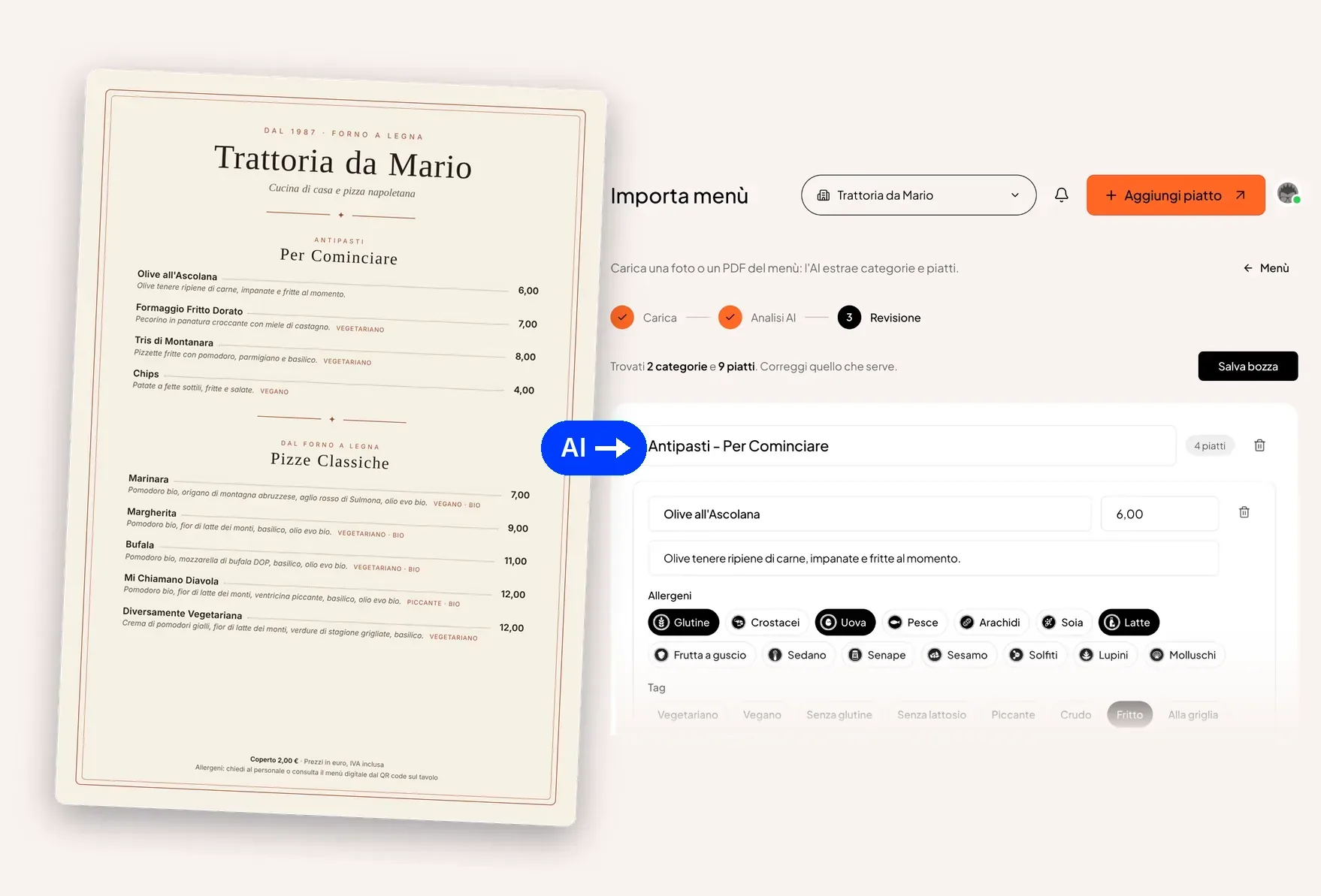
On the left, the PDF menu of Trattoria da Mario; on the right, the import review screen (interface in Italian) with the sections, dishes, prices and allergens extracted by the AI
How it works

How it works

  1. Upload the file

    Drag in your menu PDF or take a photo with your phone. Multi-page menus are fine too.

  2. Check the preview

    The AI suggests sections, dishes, prices, allergens and tags (vegan, gluten-free). Fix whatever needs fixing.

  3. Publish

    One click and the dishes are in your digital menu, live behind the QR code.

Why you no longer need to retype your menu

Digitising an 80-dish menu means hours of copy and paste, and the risk of getting a price wrong. Menoo uses an AI model that reads the document the way a person would: it recognises section headings, separates the dish name from its description and matches each dish with the right price.

It works with a designer's PDF, a photo of a laminated menu and even a scan of a handwritten one, as long as it is legible.

You always stay in control

Nothing is published without your say-so. The import produces a preview where you can rename sections, correct prices, remove dishes and check the suggested allergens, which must always be confirmed by someone who knows the recipes.

  • Allergens and tags suggested by the AI, confirmed by you
  • Prices stored exactly, to the cent
  • If extraction fails, the import does not count towards your allowance

After the import, the menu runs itself

Once published, dishes are edited from the dashboard and every change reaches guests at their tables in real time. When the season changes you can simply import the new menu instead of editing dish by dish.

FAQ

Questions about aI menu import

Answers to the most common questions about this feature.

Which file formats can I upload?

PDF, JPG, PNG and HEIC (iPhone photos), up to 20 MB per file. Multi-page PDFs are read in full.

Does the AI recognise allergens too?

It suggests the allergens it can infer from the ingredients written on the menu, but responsibility stays with the restaurant: that is why they must always be checked in the preview before publishing.

How many imports can I do?

The Base plan includes 5 imports a month; the Pro plan is unlimited. The Free plan does not include AI import: dishes are added by hand.

Fewer reprints. More time with your guests.

Create your digital menu for free: all you need is your menu PDF and five minutes.